Quick Start | Build & Test your First Trading Robot
All you need is to add three (3) Lines of code to your existing Python project.
01: Import the VirtualMetaTrader5 class
from strategytester5.MetaTrader5.api import VirtualMetaTrader5
02: Assign the parent (MetaTrader5) initialized instance to the VirtulMetaTrader5 object
if not mt5.initialize():
    raise RuntimeError(f"Failed to initialize mt5. Error = {mt5.last_error()}")

virtual_mt5 = VirtualMetaTrader5(parent_mt5=mt5)
Optional : Choosing the right MT5 instance
Since the VirtualMetaTrader5 object has similar methods and constants to MetaTrader5 API.
To keep all the code in a single file, introduce if statements to check for passed arguments from the script.
Rule of Thumb
For instance, if a user has passed --backtesting when calling the main script the script should use a simulated MetaTrader5 rather than the actual one.
script_argument = sys.argv[1:]
if "--backtesting" in script_argument:
    mt5 = VirtualMetaTrader5(parent_mt5=parent_mt5) # Assign parent MetaTrader5 to the virtual MetaTrader5 class object
else:
    mt5 = parent_mt5
Always use the virtual MetaTrader5 object for backtesting and visualization purposes and stick to the original one for live trading. That's all
03: Backtesting your Python Trading Strategies
To Backtest your trading systems call the function run_backtesting.
if "--backtesting" in script_argument:

    stats = run_backtesting(
        main_function=main,
        tester_config=tester_config,
        virtual_mt5=mt5,
        logging_level=logging.DEBUG
    )

else:
    # run the script on the market (realtime)
    while True:
        main()
Tester Configurations
The so-called tester_config is supposed to be a dictionary with a set of key, and value pairs that resemble MetaTrader5's strategy tester section.
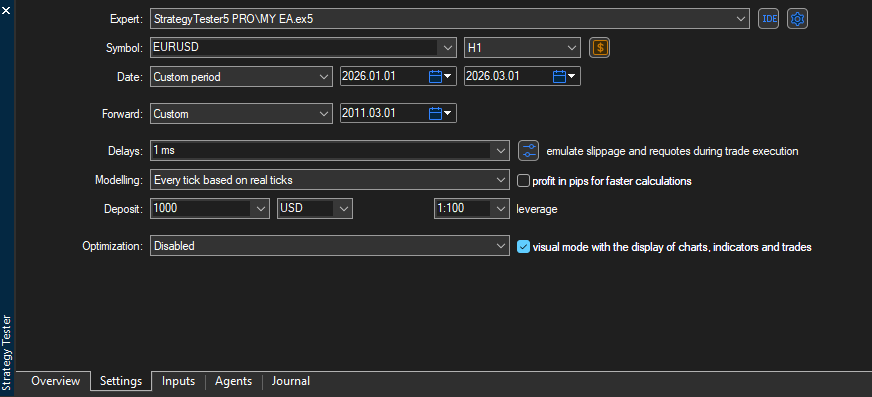
tester_config = {
        "bot_name": "RSI Strategy Bot",
        "symbols": ["EURUSD"],
        "timeframe": "H1",
        "start_date": "01.01.2026",
        "end_date": "01.06.2026",
        "modelling" : "open price only",
        "deposit": 1000,
        "leverage": "1:100"
}
Rule of Thumb
Storing tester configuration in a JSON file is the best way forward. It helps adjust the values without changing the original code :)
A complete Trading robot Example.
import logging
from strategytester5.MetaTrader5.api import VirtualMetaTrader5
from strategytester5.tester import run_backtesting
from strategytester5.trade_classes.Trade import CTrade
import MetaTrader5 as parent_mt5
import sys

if not parent_mt5.initialize():
    raise RuntimeError(f"Failed to initialize mt5. Error = {parent_mt5.last_error()}")

script_argument = sys.argv[1:]
if "--backtesting" in script_argument:
    mt5 = VirtualMetaTrader5(parent_mt5=parent_mt5) # Assign parent MetaTrader5 to the virtual MetaTrader5 class object
else:
    mt5 = parent_mt5

# ---------------------- inputs/global variables ----------------------------

symbol = "EURUSD"
timeframe = mt5.TIMEFRAME_H1 # This should be an integer so you should convert timeframe in string into integer
MAGIC_NUMBER = 1001

# ---------------------------------------------------------

m_trade = CTrade(terminal=mt5, symbol=symbol, magic_number=MAGIC_NUMBER, deviation_points=100)

def pos_exists(magic: int, pos_type: int) -> bool:
    """Checks if position exists"""

    positions_found = mt5.positions_get()
    if positions_found:
        for position in positions_found:
            if position.type == pos_type and position.magic == magic:
                return True

    return False


def main(stop_loss: float=500,
         take_profit: float=700
         ):

    symbol_info = mt5.symbol_info(symbol) # Symbols information
    if symbol_info is None:
        return

    pts = symbol_info.point

    lot_size = symbol_info.volume_min # use the minimum volume (lot size)

    ticks = mt5.symbol_info_tick(symbol)

    if ticks is None:
        return

    ask = ticks.ask
    bid = ticks.bid

    # print(f"ask: {ask}, bid: {bid}, pts: {pts}")

    if not pos_exists(magic=MAGIC_NUMBER, pos_type=mt5.POSITION_TYPE_BUY): # if a buy position doesn't exist
        m_trade.buy(volume=lot_size,
                    price=ask,
                    sl=ask-stop_loss * pts,
                    tp=ask+take_profit * pts,
                    comment="Simple bot Buy Trade"
                    ) # open a new buy position (trade)

    if not pos_exists(magic=MAGIC_NUMBER, pos_type=mt5.POSITION_TYPE_SELL): # if a sell position doesn't exist
        m_trade.sell(volume=lot_size,
                     price=bid,
                     sl=bid + stop_loss * pts,
                     tp=bid - take_profit * pts,
                     comment="Simple bot Sell Trade"
                     ) # open a new sell position (trade)

tester_config = {
        "bot_name": "RSI Strategy Bot",
        "symbols": ["EURUSD"],
        "timeframe": timeframe,
        "start_date": "01.01.2026",
        "end_date": "01.06.2026",
        "modelling" : "1 minute ohlc",
        "deposit": 1000,
        "leverage": "1:100"
}

if "--backtesting" in script_argument:

    stats = run_backtesting(
        main_function=main,
        tester_config=tester_config,
        virtual_mt5=mt5,
        logging_level=logging.DEBUG
    )

else:
    # run the script on the market (realtime)
    while True:
        main()
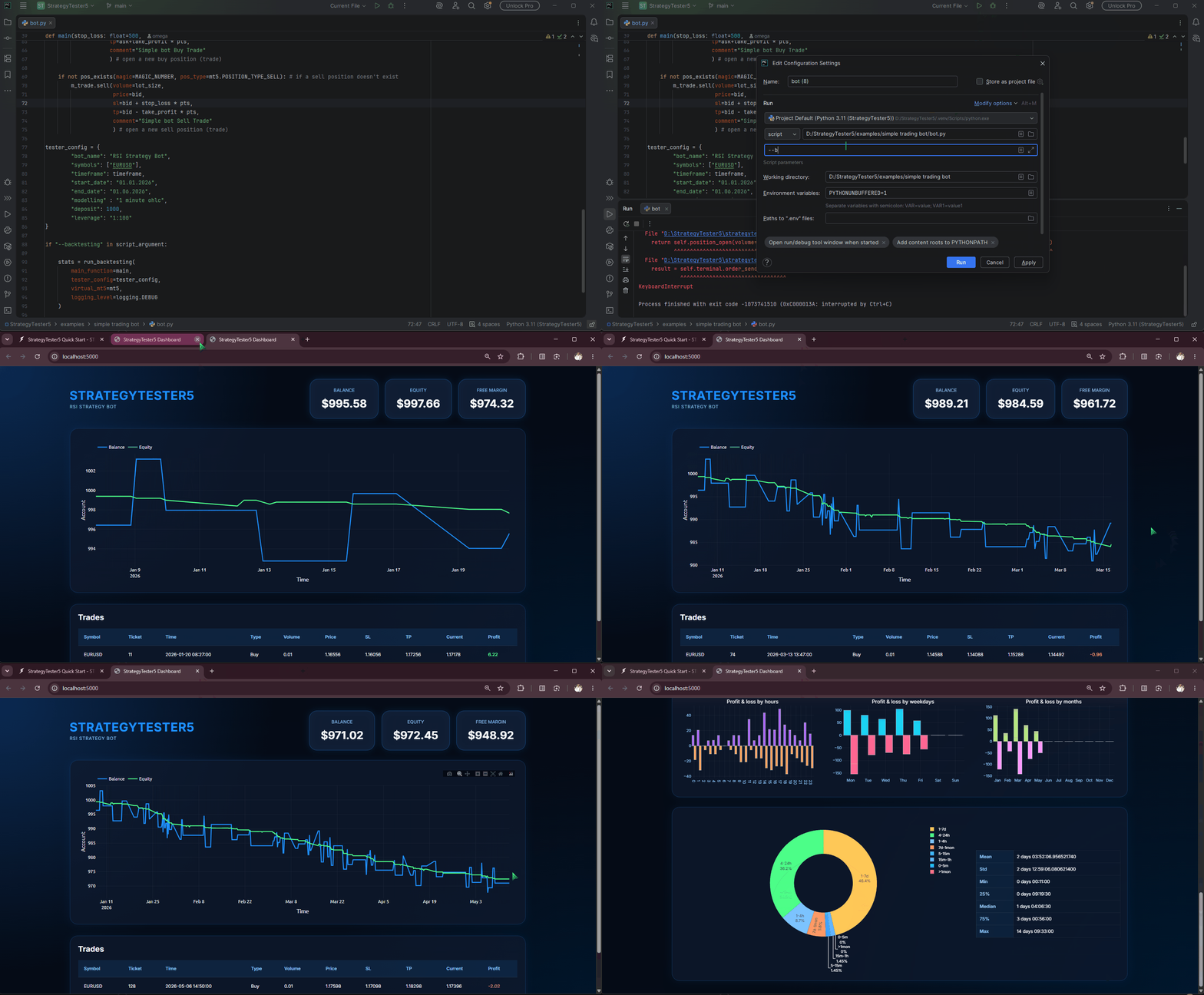
And that’s it: Calling a script with — backtesting will start backtesting (simulation) in the web browser.
python bot.py --backtesting
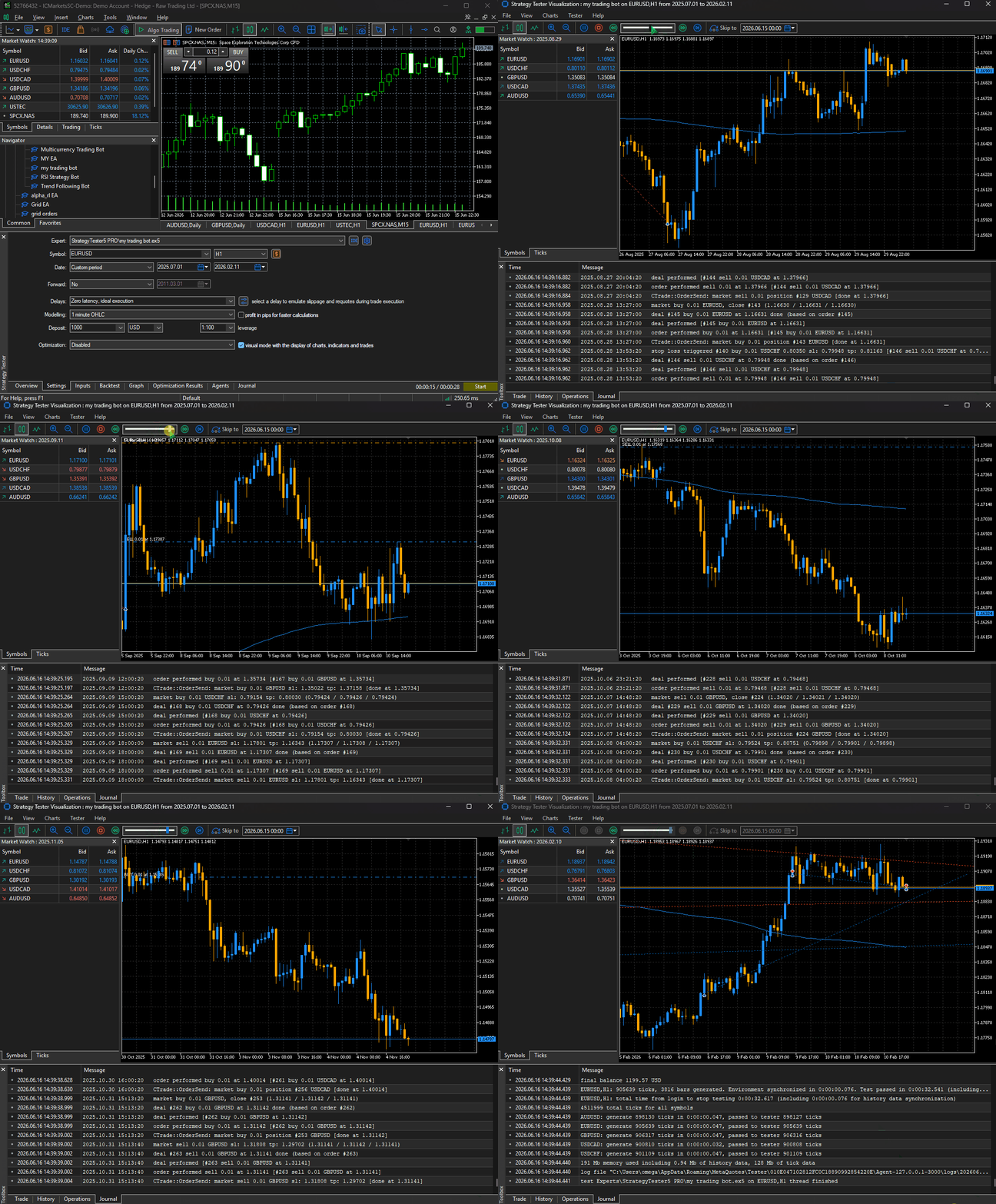
To backtest your strategies in MetaTrader5’s StrategyTester App, add visual_mode to tester configurations.
tester_config = {
        "bot_name": "RSI Strategy Bot",
        "symbols": ["EURUSD"],
        "timeframe": timeframe,
        "start_date": "01.01.2026",
        "end_date": "01.06.2026",
        "modelling" : "1 minute ohlc",
        "deposit": 1000,
        "leverage": "1:100",
        "visual_mode": True
}
This time, when you run the script using the same command, backtesting will take place inside the MetaTrader5 App (terminal)🤯
More examples and Python files used in this article are found here: GitHub repo.