RSI Trading Bot Example
Imports
The first thing we do is, import all the necessary modules
import logging
from strategytester5.MetaTrader5.api import VirtualMetaTrader5
from strategytester5.tester import run_backtesting
from strategytester5.trade_classes.Trade import CTrade
import MetaTrader5 as parent_mt5
import pandas as pd
from ta.momentum import rsi
import sys
Note
From momentum submodule we import a method called rsi which calculates the indicator.
from ta.momentum import rsi
MetaTrader5 Initialization
Note
Despite the strategytester5 framework simulating the MetaTrader5 terminal, it still relies of the platform for crucial information from instruments (symbols) and a broker's account.
This is a crucial step that shouldn't be missed.
if not parent_mt5.initialize():
    raise RuntimeError(f"Failed to initialize mt5. Error = {parent_mt5.last_error()}")
VirtualMetaTrader5
To be able to backtest and live trade on a single file you have to choose the appropriate MetaTrader5 to use.
script_argument = sys.argv[1:]
if "--backtesting" in script_argument:
    mt5 = VirtualMetaTrader5(parent_mt5=parent_mt5) # Assign parent MetaTrader5 to the virtual MetaTrader5 class object
else:
    mt5 = parent_mt5
Optional | Global variables and the CTrade helper
symbol = "EURUSD"
timeframe = mt5.TIMEFRAME_H1 # This should be an integer so you should convert timeframe in string into integer

# ---------------------------------------------------------

MAGIC_NUMBER = 1001
m_trade = CTrade(terminal=mt5, symbol=symbol, magic_number=MAGIC_NUMBER, deviation_points=100)
RSI Reversal Strategy
The strategy is simple; We open a long trade when the price reaches the oversold threshold and do the opposite when the price reaches an overbought threshold, we open a short trade.
The common thresholds are usually 30.0 and 70.0 for oversold and overbought respectively. In other words, these are short and sold signals respectively.
When a long signal is receved we close short trades and when a short signal is received we do the same but, oppposite, close a long trade.
Not to mention, we open a single trade (position) in one direction at a time.
def pos_exists(magic: int, pos_type: int) -> bool:
    """Check if position exists"""
    positions_found = mt5.positions_get()
    for position in positions_found:
        if position.type == pos_type and position.magic == magic:
            return True

    return False

def close_pos_by_type(magic: int, pos_type: int):
    """Close positions by type"""
    positions_found = mt5.positions_get()
    for position in positions_found:
        if position.type == pos_type and position.magic == magic:
            m_trade.position_close(position.ticket)


def main():

    indicator_window = 14
    rates = mt5.copy_rates_from_pos(symbol, timeframe, 0, indicator_window)

    if rates is None or len(rates) < indicator_window: # if no information was found, or less than expected rates were returned
        return # prevent further calculations

    rates_df = pd.DataFrame(data=rates)
    rsi_value = rsi(close=rates_df["close"], window=indicator_window).iloc[-1]

    # rsi strategy

    rsi_oversold = 30.0
    rsi_overbought = 70.0

    symbol_info = mt5.symbol_info(symbol)
    lot_size = symbol_info.volume_min


    if rsi_value < rsi_oversold: # long signal
        if not pos_exists(magic=MAGIC_NUMBER, pos_type=mt5.POSITION_TYPE_BUY):
            m_trade.buy(volume=lot_size, price=symbol_info.ask)

        close_pos_by_type(magic=MAGIC_NUMBER, pos_type=mt5.POSITION_TYPE_SELL)

    if rsi_value > rsi_overbought: # short signal
        if not pos_exists(magic=MAGIC_NUMBER, pos_type=mt5.POSITION_TYPE_SELL):
            m_trade.sell(volume=lot_size, price=symbol_info.bid)

        close_pos_by_type(magic=MAGIC_NUMBER, pos_type=mt5.POSITION_TYPE_BUY)
Backtesting
Learn about tester configurations.
tester_config = {
        "bot_name": "RSI Strategy Bot",
        "symbols": ["EURUSD"],
        "timeframe": "H1",
        "start_date": "01.01.2026",
        "end_date": "01.06.2026",
        "modelling" : "open price only",
        "deposit": 1000,
        "leverage": "1:100"
}

if "--backtesting" in script_argument:

    stats = run_backtesting(
        main_function=main,
        tester_config=tester_config,
        virtual_mt5=mt5,
        logging_level=logging.DEBUG
    )
Running the script in the command prompt with parameter(s) --backtesting, will open a browser tab on localhost, from there your trading operations will be visualized.
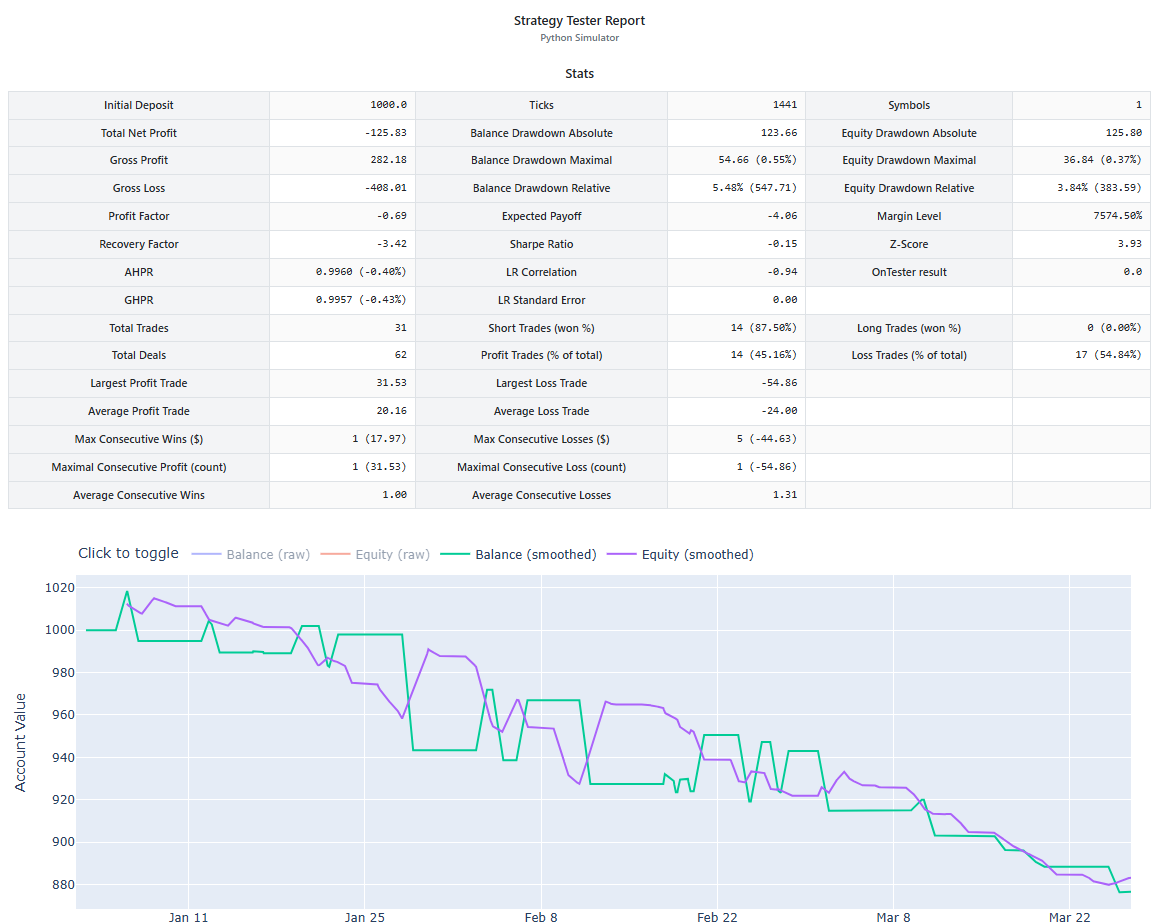
Other Working examples and trading robots can be found here.